
Noobs in Combat How to Ping: Map Marker Controls and Team Strategy
In Noobs in Combat, ping the map by pointing your cursor at any targeted ground tile and pressing right-click. This marker alerts allied players or friendly bots to critical objectives, incoming enemy threats, or coordinates that urgently require resupply support.
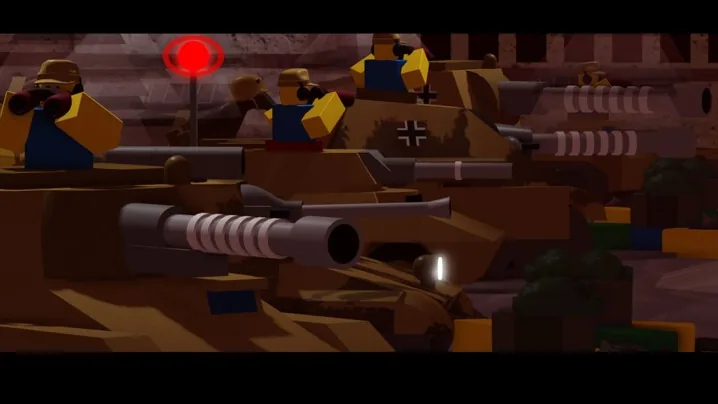
In Noobs in Combat, ping the map by pointing your cursor at any targeted ground tile and pressing right-click. This marker alerts allied players or friendly bots to critical objectives, incoming enemy threats, or coordinates that urgently require resupply support.
Placing Map Pings and Checking Terrain Data
Placing a map ping requires only a right-click on your mouse while hovering over the chosen tile. This action places a visual beacon on the field that displays across your team's interface, allowing cooperative partners to identify targets without typing in chat. Friendly artificial intelligence units also utilize this system, occasionally transmitting automatic pings when their squads run out of resources and need field logistics.
Map pings function alongside the game's diagnostic mouse overlay. Holding down the Ctrl key while moving your cursor across any hex reveals the full defensive and movement properties of that specific terrain tile. Combining terrain inspection with precise ping placement allows teammates to assess whether an enemy position is vulnerable to assault or fortified behind high defense bonuses. These basic controls prevent units from marching blindly into terrain that restricts movement speed or line of sight.
Coordinating Supply Lines and Rally Points
Pings serve a practical purpose during cooperative logistics management. In this turn-based system, logistics dictate whether an army can function. When ammunition and fuel lines fail, tanks and armored vehicles lose the ability to move, aircraft crash out of the sky, and infantry retain mobility but cannot fire their weapons. Pinging depleted forward units signals friendly players to deploy supply runners or position supply trucks within range before frontline forces get stranded.
Marking capture points also directs team resources efficiently. Capturing a headquarters yields 25 Tix per turn, while capturing standard contested territory provides 15 Tix per turn, alongside 5 Tix awarded per enemy kill. Placing tactical pings on neutral outposts or enemy headquarters focuses allied fire on economic targets, generating the funds required to sustain heavy unit production across successive turns.
Terrain Assessment for Strategic Markers
Inspecting ground stats before dropping a ping determines whether an attack can succeed. Different tiles impose severe penalties or grant heavy survivability modifiers that dictate which squad types should advance.
| Terrain Type | Defensive and Vision Stats | Tactical Ping Recommendation |
|---|---|---|
| Bunker | 10% base defense, +8 defense against non-adjacent attackers, blocks sight | Ping to call for heavy assaults or mark fortified emplacements housing an enemy anti tank gun. |
| Forest | 20% defense bonus, +1 tire, half-track, and orbit movement cost, blocks vision | Ping to designate ambush locations for armor or mark hidden infantry waiting to halt enemy advances. |
| Roads and Railroads | 10% defense penalty, no added movement cost, enables train transit | Ping to mark high-speed vehicle avenues or highlight exposed enemy transport convoys for interception. |
| Mountain | 20% defense bonus, +1 vision range, blocks vehicle entry, +0.5 foot movement cost | Ping to direct spotters and scouting infantry toward high ground to clear fog across nearby valleys. |
Combining Audio Scouting with Defensive Pings
Scouting the battlefield before dropping a marker involves paying attention to environmental sound cues during the enemy's turn. Moving units produce distinct sound signatures across the map: infantry produce audible footsteps, bikes and armored cars create rolling wheel sounds, tanks output loud track rattles, and planes generate wind turbulence. Listening carefully during hostile movements provides a reliable estimate of the enemy's troop composition and direction of travel even before they enter visual range.
Once unit audio indicates an approaching assault, use a ping to set up a defensive perimeter in forests or trenches. Directing friendly recon units to establish sightlines allows heavy artillery and armored units to engage targets safely from range. Whether coordinating defensive stands in the cooperative campaign or directing tactical maneuvers in competitive pvp rooms, consistent map pinging ensures your team reacts promptly to shifting battle lines.
Next step
Morale Mechanics
Understand how morale values trigger retreats, protect advancing squads, and let you capture neutral enemy vehicles during turn-based skirmishes.
Related Guides
Morale Mechanics
Understand how morale values trigger retreats, protect advancing squads, and let you capture neutral enemy vehicles during turn-based skirmishes.
Perks Guide
Review passive perk rules in Noobs in Combat to optimize combat movement, artillery coordination, ambush positioning, and vehicle supply management.